vLLM Learning
- LeaderWorkerSet https://github.com/kubernetes-sigs/lws is an API created by a Kubernetes special interest group that aims to address the common patterns of deploying LLM on top of Kubernetes, especially multi-node LLM sharding.
- When we are deploying LLM across multiple nodes, if 1 node fails due to OOM, electricity, etc. the whole group that hosts the model needs to be restarted. LeaderWorkerSet aims to handle this kind of operation.
- why multiple-node LLM deployment? a single GPU has limited memory capacity. smaller parameter models can be deployed in a single GPU, some can be deployed in multiple GPUs inside one physical host, larger models need to be deployed and sharded across multiple physical hosts.
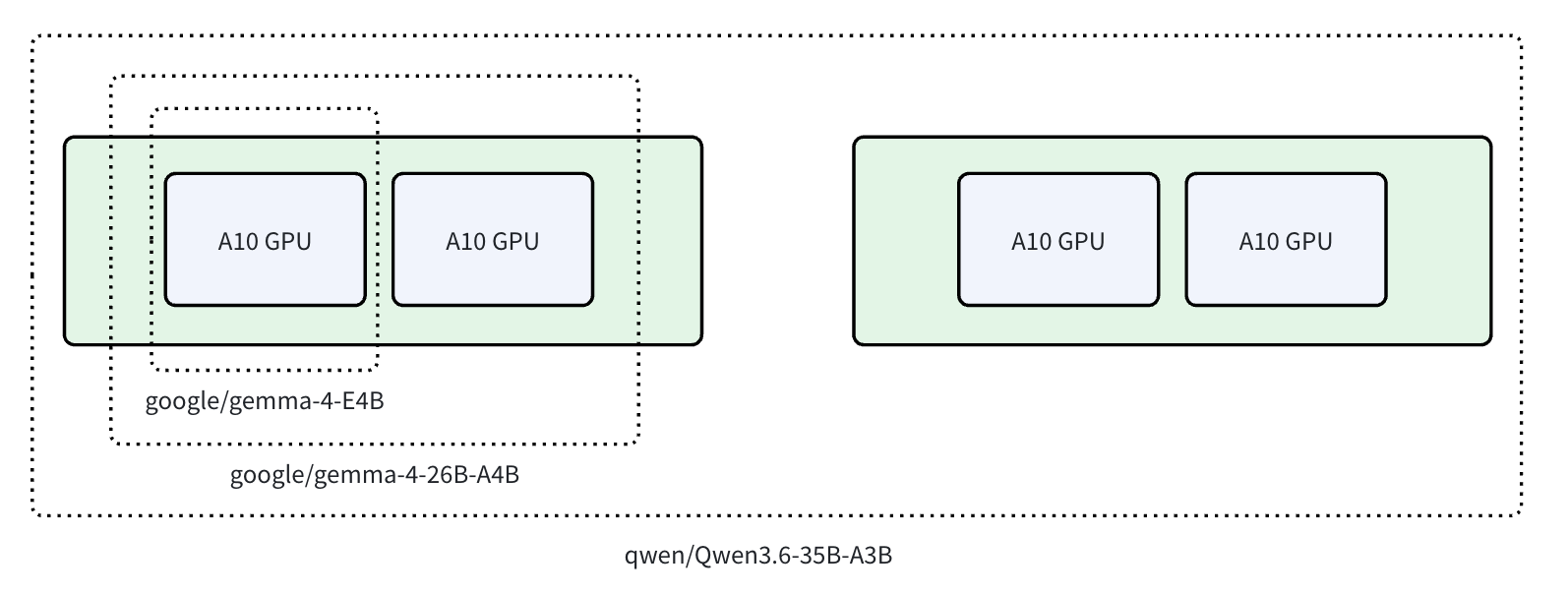
- most LLMs (large language models) today are based on the Transformer architecture, specifically the decoder-only variants popularized by GPT (Generative Pre-trained Transformer) https://jalammar.github.io/illustrated-transformer/ (even I am still confused right now haha)
- The Transformer architecture consists of multiple layers where there are attention sublayers and feed-forward network sublayers. multi-gpu or multi-node LLM deployment works by distributing the layers across the GPUs
Node 1 GPU 1: layers 0-7
Node 1 GPU 2: layers 8-15
Node 2 GPU 1: layers 16-23
Node 2 GPU 2: layers 24-31
- when deploying a model that would not be able to fit into 1 GPU, there are several ways to make it work:
- quantization
- pruning
- distillation
-
parallelism https://www.infracloud.io/blogs/inference-parallelism/
-
Inference parallelism aims to distribute the computational workload of AI models. there are several methods
- Tensor Parallelism
- Pipeline Parallelism
-
Expert Parallelism
-
Pipeline Parallelism distributes the layers across multiple GPUs. if a model requires 200 GB of GPU memory, with 4-way Pipeline Parallelism, we can distribute the workload to GPUs with only 50 GB of memory each.
Node 1 GPU 0: layers 0-7
Node 1 GPU 1: layers 8-15
Node 1 GPU 2: layers 16-23
Node 1 GPU 3: layers 24-31
-
Tensor Parallelism keeps all layers on all GPUs, but each GPU only stores a subset of the columns (or rows) of the weight matrices, eventually reducing the GPU memory needed per device.
but all GPUs require a faster communication channel. use Tensor Parallelism if GPU communication can be fast (NVLink or InfiniBand) -
always check nvidia-smi topo -m before deciding parallelism strategy.
-
nvidia-smi can output a topology of the GPUs inside the node. it shows how the GPUs communicate with each other. NV means NVLink connection.
nvidia-smi topo -m
        GPU0    GPU1    GPU2    GPU3    CPU Affinity    NUMA Affinity
GPU0     X      NV2     NV1     NV1     0-23            0
GPU1    NV2      X      NV1     NV1     0-23            0
GPU2    NV1     NV1      X      NV2     24-47           1
GPU3    NV1     NV1     NV2      X      24-47           1
- LLM image is huge, vllm for example, container image is between 9-12GB https://hub.docker.com/r/vllm/vllm-openai. imagine spawn a new node of Kubernetes, and waiting 5-10 minutes to only pulling the image.
- to speed up container pull, there are several alternative:
- Custom disk (from a pre-baked snapshot) mounted to the node at /var/lib/containerd, where containerd stores container images. When a new node is created, the LLM image already exists locally.
- containerd snapshotter plugin that support lazy load, like nydus, soci, or stargz.
- P2P image distribution like dragonfly or spegel.
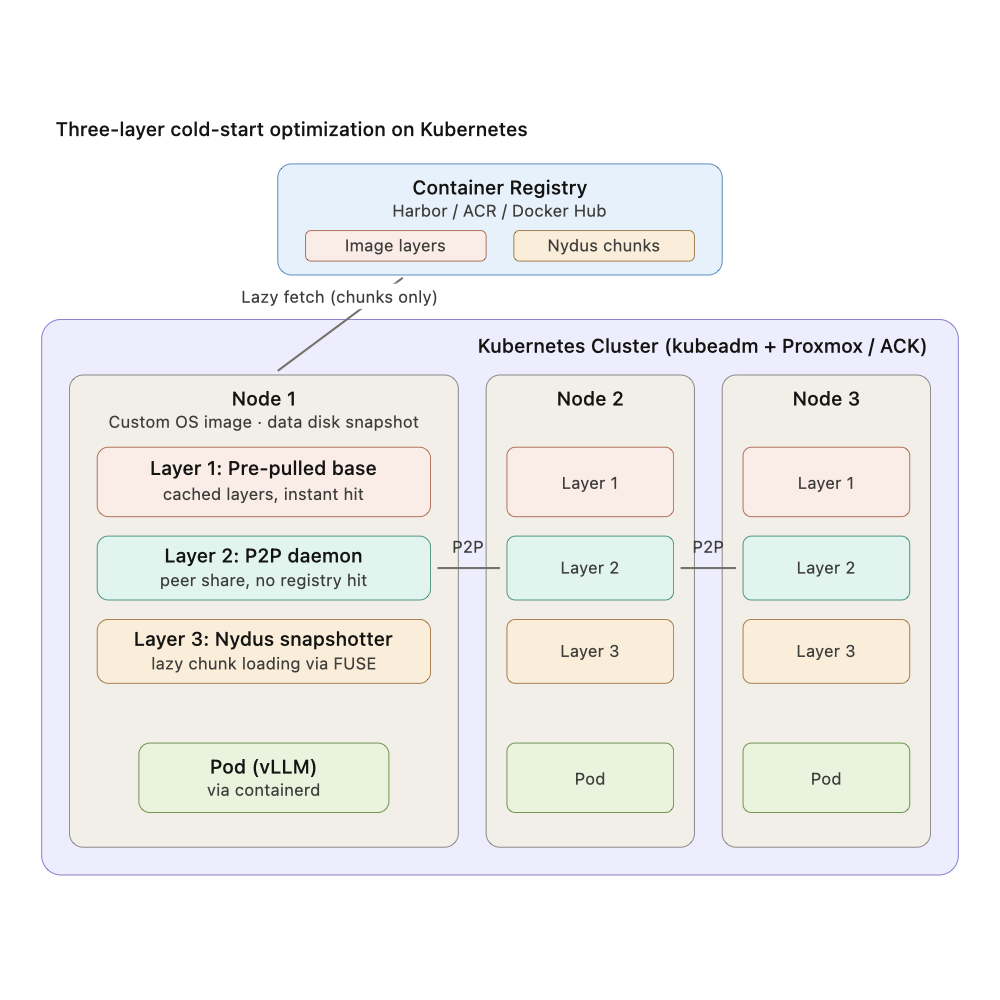 14. Same approach works for LLM model weights, bake them into a disk snapshot, mount via hostPath in the kubernetes pods.
Todo
- Understand Transformer & Attention
- jalammar.github.io/illustrated-transformer
- jalammar.github.io/illustrated-gpt2
- https://lilianweng.github.io/posts/2018-06-24-attention/
- https://arxiv.org/abs/1706.03762
- Understand more on Parallelism, KV Cache, and Optimization
- bentoml.com/llm/inference-optimization/data-tensor-pipeline-expert-hybrid-parallelism
- docs.vllm.ai/en/stable/serving/parallelism_scaling
- docs.jarvislabs.ai/blog/scaling-llm-inference-dp-pp-tp
- infracloud.io/blogs/inference-parallelism
- https://lilianweng.github.io/posts/2023-01-10-inference-optimization/
- LLM serving full stack overview https://www.runpod.io/articles/guides/ai-model-serving-architecture-building-scalable-inference-apis-for-production-applications